IP

Thursday, May 26, 2011

Bluetooth Security – The Tools,the Rules and stuff


Everybody is having a Bluetooth phone nowadays,and we are merely concerned about the safety of these vulnerable and penetrable devices. BE it Nokia,Sony or any other brand,the technology remains same and provides whackers (wireless malicious hackers) new playground for their experiments.In this article,I will be listing some Bluetooth tools for security – both breaking and making.


Bluediving
It is a security and Bluetooth penetration testing suite and implements attacks like BlueSnarf,BlueSnarf++ and BlueSmack.Bluediving running on Linux - rdhacker.blogspot.comIt features Bluetooth address spoofing,socket shells like AT and RFCOMM and also implements tools like L2CAP packet generator and connection resetter and RSCOMM scanner which are a must for any Bluetooth security enthusiastic.

Download BlueDiving


Blooover
Blooover (and Blooover 2) is a tool that is intended to run on J2ME enabled cell phones that appear to be comparably seamless.It serves as an audit tool that people use to check if their phones and phones of friends :P are vulnerable or not.
Bloover running on S40 - rdhacker.blogspot.com Bloover running on S40 - rdhacker.blogspot.com
Also there is also a tool “Super Bluetooth Hack” which is quite popular nowadays to hack into Bluetooth devices.

Download Blooover

Medieval Bluetooth Network Scanner
This program can analyze and scan your Bluetooth network, giving detailed information about local and remote devices found. You can also browse supported services of each device in a clear and straightforward user-interface. If you have a Bluetooth dongle installed on your PC, download "Medieval Bluetooth Network Scanner" now, it's totally free of charge and very handy!
Bluetooth Network Scanner running on Win Vista - rdhacker.blogspot.comBluetooth Network Scanner running on Win Vista - rdhacker.blogspot.comIt can deep scan all services of your Bluetooth device using this software.

Download Medieval Bluetooth Network Scanner

These software are free to use and quite handy to audit.However you,you ought to follow some basic rules of Bluetooth security for maximum protection-
  • Switch off Bluetooth when not in use.
  • Purchase only devices having long PIN codes.
  • Refrain from entering the PIN into Bluetooth device for pairing.
  • Limit the electric power itself to keep range of network within physical area (for Bluetooth enabled routers and devices other than cell phones).
  • Always generate initialization keys when 2 Bluetooth devices meet for the first time.
  • Never allow auto connection (Big loophole in Cell phone devices,easily exploited by a bit of social engineering).

Wednesday, May 25, 2011

Ethical Hacking” Case Studies


Download “Ethical Hacking” Case Studies from www.orsoc.org.uk


Click Here to Download the presentation

Download Major Hacking Case Studies from www.isaca.org.hk


Download Bluetooth Hacking Case Study from www.garykessler.net


Download Anti-Hacking Case Studies


Friday, May 20, 2011

10 Reasons to Protect Your Home Wireless Network


Internet security is a major concern for anyone who relies upon a computer network to conduct their business. From large corporations and government agencies to the casual user on her PC, protecting your computer network has never been more important, and the stakes have never been higher. For the home user, here are 10 reasons to protect your home wireless network:

  1. Malware – Malicious software that can wreak havoc on your network is a threat to any unprotected network. Viruses, trojan horses, worms, etc. are forms of malware.
  2. Identity Theft – Hackers who gain access to your network can obtain personal information stored there which they can use to steal or clone your identity for later use – at your expense, as in …
  3. Financial Loss – The most common purpose of identity theft. Unprotected networks are vulnerable to access by intruders who can get passwords, account numbers and thereby access your money as well.
  4. Sensitive Data – Apart from financial information, there is much that can leave you vulnerable stored on your computer, such as names and addresses of contacts who may then also be at risk by compromising this information.
  5. Social Networking – There is a plethora of personal information that can be collected at common social networking sites such as Facebook and Twitter which could be subject to access by hackers on an unprotected network.
  6. Adware – This is a more mainstream version of malware, with the exception that, although it is still done without the user’s express permission in many instances as with malware, it is done so by advertisers and merchants for the purpose of compiling consumer habits in order to more effectively market their goods or services.
  7. Bandwidth – Not every instance of accessing your network by unwanted parties is with the intent of harming your network. There are also those who can “piggyback” on your network, in order to gain internet access at the cost of bandwidth that you’re paying for.
  8. Liability – If you’re using your network for business purposes, you could be held liable for any financial or data losses resulting from unlawful access to your network.
  9. Power Surges – Not all threats to your network are human or nefarious by nature. Lightning strikes and surges in  -(or loss of ) your power source can be just as damaging to your hardware as other external threats can be to your software. Surge protection and/or a UPS (uninterruptible power supply) is advised.
  10. Spam – Unwanted email is more than just a nuisance. It’s also another means by which a virus or malware can be introduced into your system.
Protecting your home wireless network may require investing in some security software like a strong firewall, anti-virus and anti-malware and spam filter; but the cost of not doing so can be far greater.
Author : Melanie Slaugh

Thursday, May 12, 2011

Phone Call Spoofing


Earlier there was a call spoofing method but its not working now, But I have come across a new method fully working. Use it to call anyone using anybode else's number. You can also change your voice pitch so that the other person can't recognize you.

Warning-Only for educational purposes.


  • 1. Open http://www.crazycall.net
  • 2. Select your country and wait for the page to load.
  • 3. Enter the number you want to display in the first big box (Dont change the contents of small box if the fake number is of same country).
  • 4. Enter the number you wish to call in
    second big box.
  • 5. Choose voice pitch as normal (for same
    voice) or high or low pitch to change your
    voice.
  • 6. Click Get me a code.
  • 7. Dial the number shown on right and
    enter the shown code when asked.
  • ###################

Sunday, May 8, 2011

SpyEye Trojan Latest Version Attacks Google Chrome and Opera Web browsers


SpyEye Trojan Latest Version Attacks Google Chrome and Opera Web browsers

The latest version of the SpyEye trojan includes new capability specifically designed to steal sensitive data from Windows users surfing the Internet with the Google Chromeand Opera Web browsers.


The author of the SpyEye trojan formerly sold the crimeware-building kit on a number of online cybercrime forums, but has recently limited his showroom displays to a handful of highly vetted underground communities. We Recently chatted with a member of one of these communities who has purchased a new version of SpyEye. Screenshots from the package show that the latest rendition comes with the option for new “form grabbing” capabilities targeting Chrome and Opera users.
 SpyEye Trojan Latest Version Attacks Google Chrome and Opera Web browsers
SpyEye component in version 1.3.34 shows form grabbing options for Chrome and Opera
Trojans like ZeuS and SpyEye have the built-in ability to keep logs of every keystroke a victim types on his or her keyboard, but this kind of tracking usually creates too much extraneous data for the attackers, who mainly are interested in financial information such as credit card numbers and online banking credentials. Form grabbers accomplish this by stripping out any data that victims enter in specific Web site form fields, snarfing and recording that data before it can be encrypted and sent to the Web site requesting the information.


Both SpyEye and ZeuS have had the capability to do form grabbing against Internet Explorer and Firefox for some time, but this is the first time I’ve seen any major banking trojans claim the ability to target Chrome and Opera users with this feature.


Aviv Raff, CTO and co-founder of security alert service Seculert, said that both SpyEye and ZeuS work by “hooking” the “dynamic link library” or DLL files used by IE and Firefox. However, Chrome and Opera appear to use different DLLs, Raff said.


This strikes me as an incremental yet noteworthy development. Many people feel more secure using browsers like Chrome and Opera because they believe the browsers’ smaller market share makes them less of a target for cyber crooks. This latest SpyEye innovation is a good reminder that computer crooks are constantly looking for new ways to better monetize the resources they’ve already stolen. Security-by-obscurity is no substitute for good security practices and common sense: If you’ve installed a program, update it regularly; if you didn’t go looking for a program, add-on or download, don’t install it; if you no longer need a program, remove it.


UPDATE: As per Wladimir Palant - As far as Firefox goes, I noticed a bogus extension called “z” mentioned in many Adblock Plus issue reports. It uses a random extension identifier which is a pretty good indication that it is malicious (makes sure that blacklisting by extension identifier won’t work). From the name I guess that it might be related to ZBot (Zeus) but that’s only a guess. I wouldn’t be surprised if that extension also does something to prevent showing up in the usual add-ons user interface. The data for these issue reports is collected automatically (list of installed extensions is optional), the users are most likely not aware of having this extension


SOURCE: http://krebsonsecurity.com

Friday, May 6, 2011

NETBIOS HACKING

NETBIOS HACKING - BREAKING INTO SYSTEM

-What is it?-

NetBIOS Hacking is the art of hacking into someone else's computer through your computer. NetBIOS stands for "Network Basic Input Output System." It is a way for a LAN or WAN to share folders, files, drives, and printers.

-How can this be of use to me?-
Most people don't even know, but when they're on a LAN or WAN they could possibly have their entire hard drive shared and not even know. So if we can find a way into the network, their computer is at our disposal.

-What do I need?-
Windows OS
Cain and Abel - get it from here - http://www.oxid.it/

++++++++++++++++++++++++++++++++++++++++++++++++++
-[Step 1, Finding the target.]-++++++++++++++++++++++++++++++++++++++++++++++++++
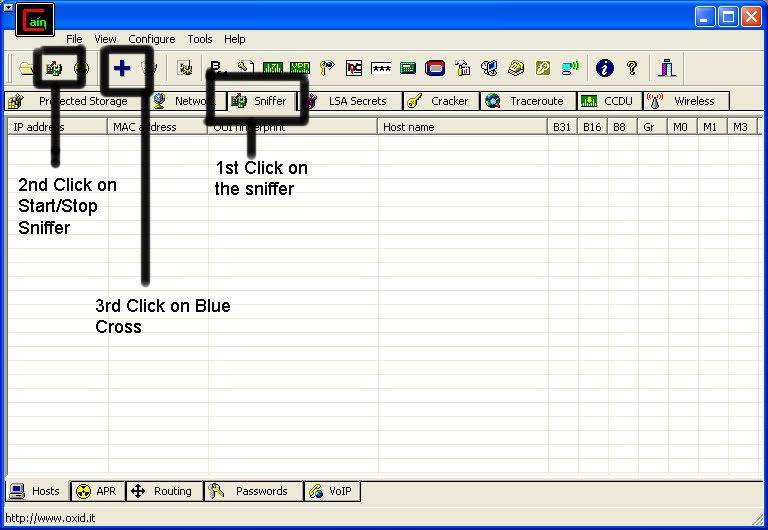
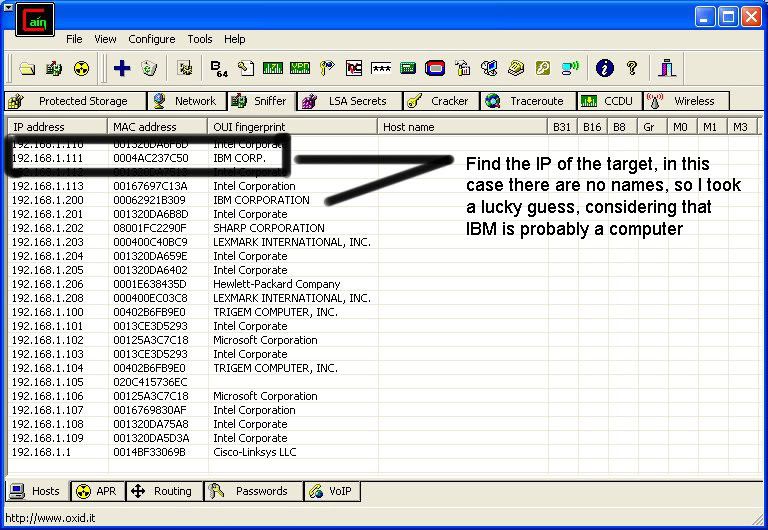
So first off we need to find a computer or the computer to hack into. So if your plugged in to the LAN, or connected to the WAN, you can begin. Open up Cain and Abel. This program has a built in sniffer feature. A sniffer looks for all IP addresses in the local subnet. Once you have opened up the program click on the sniffer tab, click the Start/Stop sniffer, and then click the blue cross


-What is it?-
NetBIOS Hacking is the art of hacking into someone else's computer through your computer. NetBIOS stands for "Network Basic Input Output System." It is a way for a LAN or WAN to share folders, files, drives, and printers.

-How can this be of use to me?-
Most people don't even know, but when they're on a LAN or WAN they could possibly have their entire hard drive shared and not even know. So if we can find a way into the network, their computer is at our disposal.

-What do I need?-
Windows OS
Cain and Abel - get it from here

CODE
http://www.oxid.it/
++++++++++++++++++++++++++++++++++++++++++++++++++
-[Step 1, Finding the target.]-++++++++++++++++++++++++++++++++++++++++++++++++++

So first off we need to find a computer or the computer to hack into. So if your plugged
in to the LAN, or connected to the WAN, you can begin.
Open up Cain and Abel. This program has a built in sniffer feature. A sniffer looks for
all IP addresses in the local subnet. Once you have opened up the program click on the
sniffer tab, click the Start/Stop sniffer, and then click the blue cross


Another window will pop up, make sure "All host in my subnet" is selected, and then click ok.
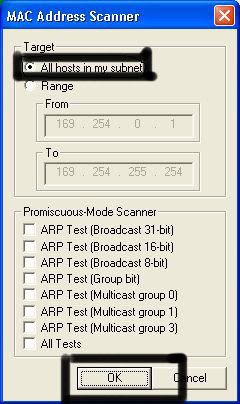


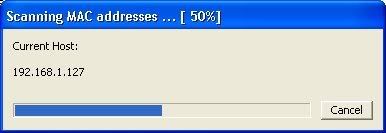
It should begin to scan.


Then IP's, computer names, and mac addresses will show up.
Now remember the IP address of the computer you are going to be breaking into.
If you can't tell whether the IP address is a computer, router, modem, etc, that's ok.
During the next step we will begin our trial and error.


++++++++++++++++++++++++++++++++++++++++++++++++++
-[Part 2, Trial and Error]-
++++++++++++++++++++++++++++++++++++++++++++++++++

Now, we don't know if we have our designated target, or if we have a computer or printer, or whatever else is on the LAN or WAN.
If you did get the IP of the target though, I still recommend reading through this section, for it could be helpful later on.
Click on the start menu and go to run, type in cmd, and click ok.
This should bring up the command prompt.
From here we will do most of the hacking.
Now I will be referring to certain commands that need to be inputted into the command prompt.
I will put these commands in quotes, but do not put the quotes in the code when you type it into the prompt.
I am only doing this to avoid confusion.
Let's get back to the hacking.
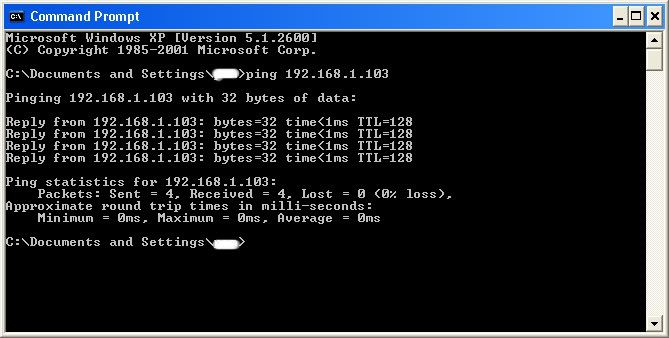
Type in "ping (IP address of the target)." For example in this tutorial, "ping 192.168.1.103."
This will tell us if the target is online.
If it worked, it will look something like this (note, I have colored out private information):


IF it didn't work, meaning that the target is not online, it will look something like this:
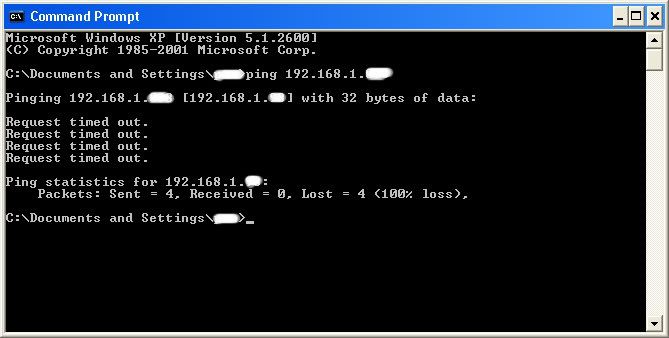


If the target is not online, either switch to a different target, or try another time. If the target is online, then we can proceed.


++++++++++++++++++++++++++++++++++++++++++++++++++
-[Part 3, Gathering the Information.]-
++++++++++++++++++++++++++++++++++++++++++++++++++

Now, input this command "nbtstat –a (IP address of target)." An example would be "nbtstat –a 192.168.1.103."
This will show us if there is file sharing enabled, and if there is, it will give us the: currently logged on user, workgroup, and computer name.
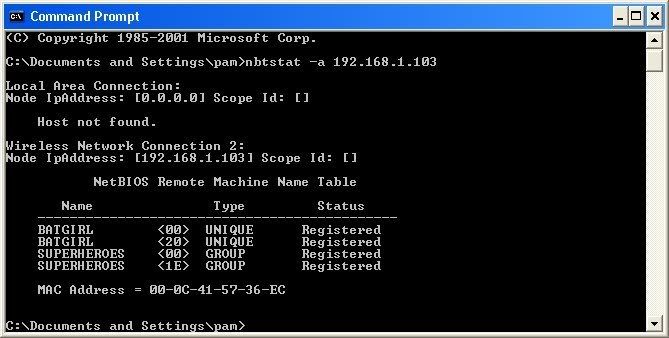


Ok, you're probably wondering, "What does all this mean to me?" Well, this is actually very important, without this, the hack would not work. So, let me break it down from the top to bottom. I will just give the first line of information, and then explain the paragraph that follows it.

The information right below the original command says: "Local Area Connection," this information tells us about our connection through the LAN, and in my case, I am not connected through LAN, so the host is not found, and there is no IP.

The information right below the "Local Area Connection," is "Wireless Network Connection 2:" It gives us information about the connection to the target through WAN. In my case I am connected through the WAN, so it was able to find the Node IpAddress. The Node IpAddress is the local area IP of the computer you are going to break into.

The NetBIOS Remote Machine Name Table, give us the workgroup of our computer, tells us if it is shared, and gives us the computer name. Sometimes it will even give us the currently logged on user, but in my case, it didn't. BATGIRL is the name of the computer I am trying to connect to. If you look to the right you should see a <20>. This means that file sharing is enabled on BATGIRL. If there was not a <20> to the right of the Name, then you have reached a dead end and need to go find another IP, or quit for now. Below BATGIRL is the computers workgroup, SUPERHEROES. If you are confused about which one is the workgroup, and the computer, look under the Type category to the right of the < > for every Name. If it says UNIQUE, it is one system, such as a printer or computer. If it is GROUP, then it is the workgroup


++++++++++++++++++++++++++++++++++++++++++++++++++
-[Step 4, Breaking In]-
++++++++++++++++++++++++++++++++++++++++++++++++++

Finally it's time.
By now we know: that our target is online, our target has file sharing, and our target's computer name.
So it's time to break in.
We will now locate the shared drives, folders, files, or printers. Type in "net view \\(IP Address of Target)"
An example for this tutorial would be: "net view \\192.168.1.103
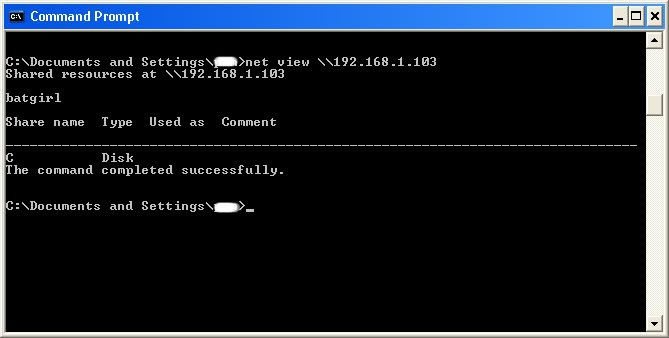


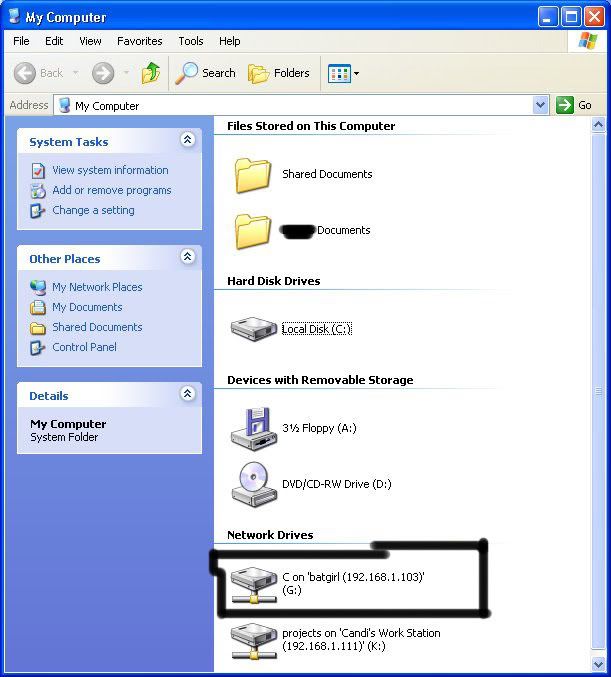
We have our just found our share name. In this case, under the share name is "C," meaning that the only shared thing on the computer is C. Then to the right, under Type, it says "Disk." Thismeans that it is the actual C DISK of the computer. The C DISK can sometimes be an entire person's hard drive.

All's that is left to do is "map" the shared drive onto our computer. This means that we will make a drive on our computer, and all the contents of the targets computer can be accessed through our created network drive. Type in "net use K: \\(IP Address of Target)\(Shared Drive). For my example in this tutorial, "net use K: \\192.168.1.103\C." Ok, let's say that you plan on doing this again to a different person, do u see the "K after "net use?" This is the letter of the drive that you are making on your computer. It can be any letter you wish, as long as the same letter is not in use by your computer. So it could be "net use G...," for a different target.
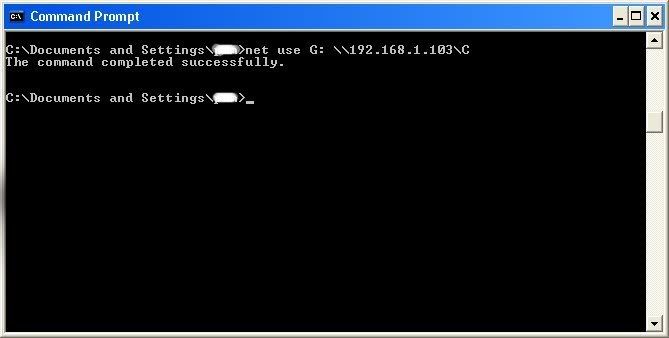


As you can see, for my hack I have already used "K," so I used "G" instead.

You may also do the same for multiple hacks.
If it worked, it will say "The command completed successfully."
If not, you will have to go retrace you steps.
Now open up "my computer" under the start menu, and your newly created network drive should be there.


Now, if you disconnect from the WAN or LAN, you will not be able to access this drive, hence the name Network Drive.

The drive will not be deleted after you disconnect though, but you won't be able to access it until you reconnect to the network.
So if you are doing this for the content of the drive, I recommend dragging the files and folders inside of the drive onto your computer,
because you never know if the target changes the sharing setting.


If you are just doing this to hack something, then go explore it and have some well deserved fun!

Saturday, April 23, 2011

How To hack facebook password for free

Hello friends today i will explain you how to hack the Facebook password or accounts remotely usingkeylogger. Its a 100% working hack and you can easily hack anyone's Facebook account or password using this hack. In this tutorial i will explain you how to hack Facebook and other passwords of any user using 100% FUD keylogger. The keylogger in this tutorial we will discuss is L33ts keylogger and its 100% FUD(fully undetectable).

Hacking Facebook account
 is very easy and just requires not more than 10 minutes of work. Don't worry i will also tell you how to protect your facebook account or passwords from such hacks and hackers. But for this you must know how hackers hack your facebook account. So first i teach you how to hack facebook account remotely and then i will tell how to protect yourself from this.

NOTE: This tutorial is for Educational purposes only i.e. to make you aware how hackers hack your Facebook accounts. Please don't misuse it. I and Isoftdl is not responsible for any damage caused by you. 

 So guys lets start hacking Facebook account or passwords....
Steps to hack Facebook account using Keylogger:
1. Creating the Keylogger Server to hack Facebook passwords.
2. Extracting the Icon from installer.
3. Bind the keylogger server with any software setup.
4. How to spread your keylogger or send it to your friends to hack their Facebook accounts or passwords.


Step 1. Creating the Keylogger Server
1. Download the keylogger.
2. Extract the file, Now you will get two folders:
a. First one contains Keylogger and Binder
b. Second Contains resource hacker tool.( to extract the icons from installers).

3. Now open the Keylogger. It contains two files one for gmail email and other for password. For this create one test account on Gmail and enter it's details in this.

hack facebook password,how to hack facebook,how to hack a facebook account

4. After entering email and password. Set the time interval usually set 3 mins i.e. after how much time you want to receive logs from the user.
5. Now click on send verification mail. This mail is to test that your keylogger is working correctly or not.
6. After you click this you will receive a confirmation mail on test account which will confirm that keylogger is working.
7. Now click on generate to set the mutex (any secret key to make your keylogger FUD) and then click on compile server.
8. Now save the file to desktop or any other location of your choice. Now your server is ready but it can be easily detected.


Step 2.: Extracting the Icon file from any installer(resource hacker)
1. Open the Resource hacker folder and open the reshacker file.
2. Now go to its menu and open any setup file. Suppose we want to attach our keylogger to Ccleaner setup file. So open the Ccleaner setup with resource hacker. 
3. Now in menu there is one action button click on it and then click save all resources.

how to hack facebook passwords,facebook hack, how to hack into someones facebook


4. Now save all the resources to desktop or any other location of your choice.
5. It consists of two files one is icon file and other is res file . We only need icon file, so you can delete the other file i.e res file.
6. Now we have Icon of installer file(as discussed above Ccleaner setup Icon).


Step 3: Bind the Keylogger server with any software
1. Now Go to keylogger folder and open the Binder.
2. Now Click on + button given below to add files.
3. Now add the keylogger server and the set up of software (i.e. in our case it's Ccleaner setup).
4. Now in menu of Binder, Go to Settings. There select the icon that we have generated in the previous step and set the location of output file as shown in figure.

facebook password hack,how to hack someones facebook,facebook password hacker,facebook hacking


5. Now again go to File's menu in Binder and click on Bind files.
6. Now your Binded keylogger is ready. Now you have to spread it or send it to the victim that is your friend.


Step4 : How to Spread Keylogger or send it to victim or friend
1. Now you have one Software setup file with keylogger attached with it.(In our case we have Ccleaner setup with keylogger attached with it.
2. Now Spread your keylogger through forums. You might be a member of various forums use them to spread your keylogger in form of software posts. You can use various software's to spread them that users frequently download.
3. Spread it through pendrives or USB hard drives. Suppose a friend asked you for a software give it the software that has keylogger attached with it. 
Note: you can also attach keylogger with images also. But that can be detectable by antivirus. So avoid such type of hacking.
So isn't that so easy to hack anyone's Facebook account in just few minutes. 

How to protect yourself from these hacks?
Prevention is always better than cure so always follow these steps:
1. Don't use cracked softwares and don't download them from unauthorized websites.
2. Always keep your antivirus and anti-spyware up to date.
3. Always scan the files before transferring them to your USB.
4. Do not allow other users to use your PC i.e password protect it.
...

Certified Ethical Hacker Training - Hacking Methodologies